
This Help topic refers to all DocuXplorer versions only when the optional QuickBooks Integration package has been purchased and installed
Finding a document from QuickBooks is as simple as selecting a transaction and from a QuickBooks menu item File | DocuXplorer | Find Document to display all the documents associated with the transaction listed in a DocuXplorer Query Results List ready to be opened, faxed, printed or e-mailed.
Users can also use the Query Results List to create new Queries that will search the DocuXplorer Library for other QuickBooks transaction documents.
To find a document from QuickBooks
Select the transaction in QuickBooks
Select the menu item File | DocuXplorer | Find Document>
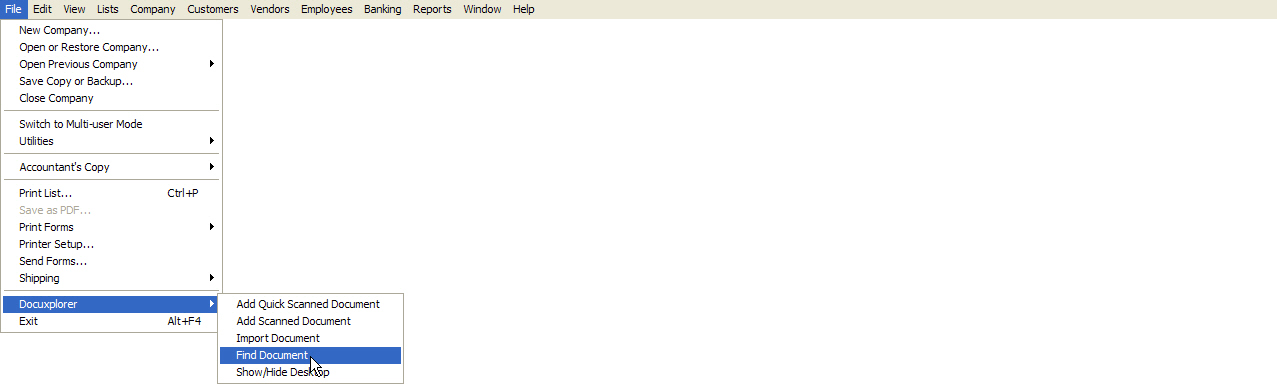
If a single document is associated with the transaction it will automatically open.
If more than one document is associated with a transaction the Find Document Query Results List will display with all documents associated to the transaction.
Select the document view from the DocuXplorer Query Results List and double click to open or right-click to bring up a menu
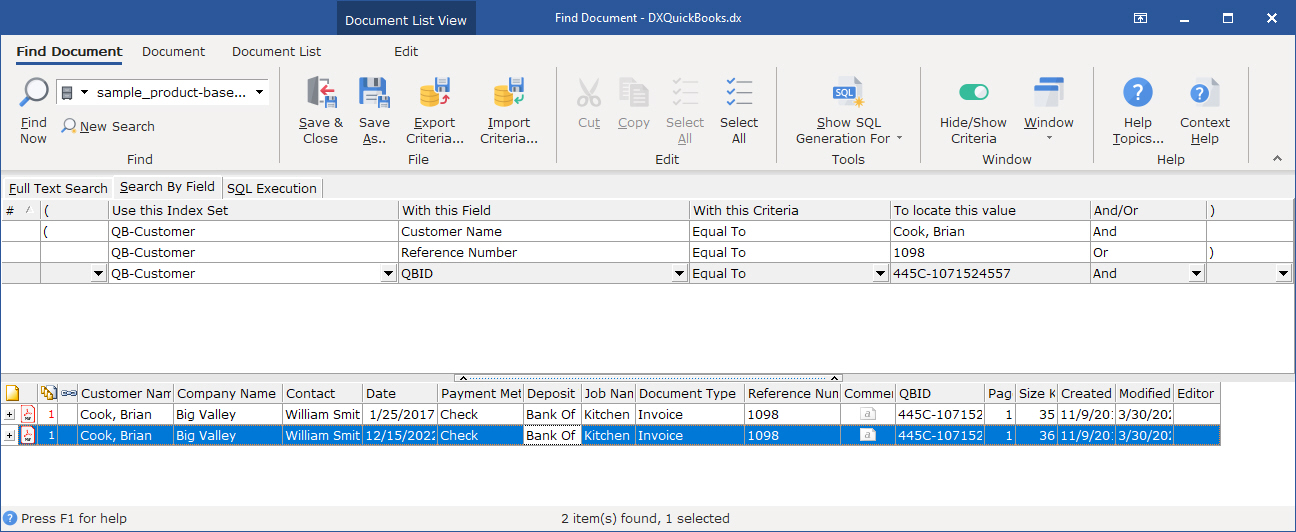
Users can use the Find Document dialog box as shown above to change search criteria and expand or limit their search as need. You can see more information about DocuXplorer search by clicking on the link to the DocuXplorer Search Engine Overview
Note - DocuXplorer can also locate documents by QuickBooks Transaction ID select Tools | Options | QuickBooks | Included QuickBooks Transaction ID to find documents to turn on this feature. see help "QuickBooks Defaults" for more details