
This Help topic refers to the following editions:
þ Enterprise þProfessional
The Document Selection List feature is found on a document's right-click menu. The feature allows users to select multiple documents from any folder in a Cabinet and add them to a list which can then be used to merge the selected documents, attach the selected documents to an email, or to create a Saved Search Document. If a document is selected from a different Cabinet the user will be prompted to either cancel the addition or create a new Selection List.
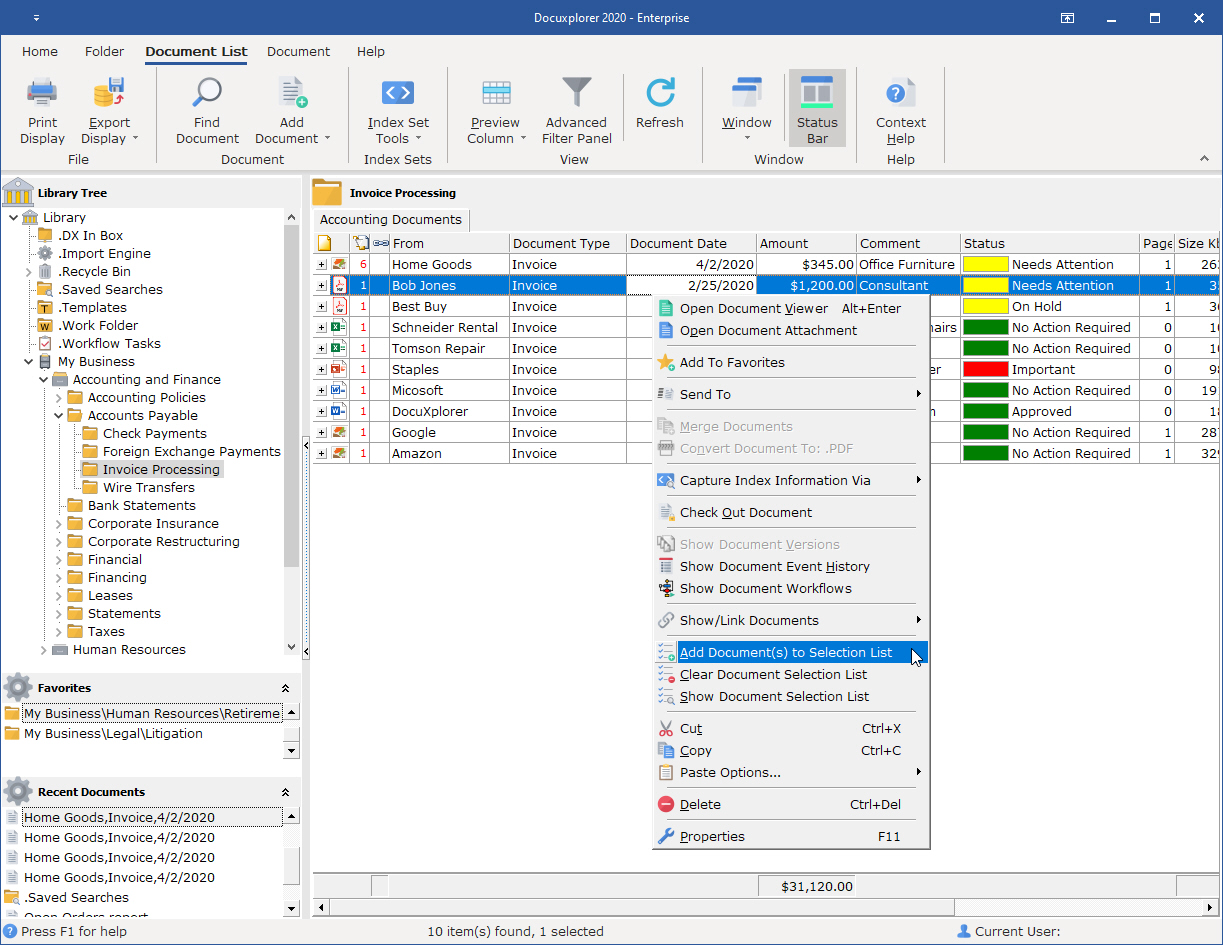
Add to Document Selection List
Adds the selected document to a selection list. When multiple documents are highlighted (selected) all the selected documents will be added to the selection list. Documents added to a selection list are displayed in the Find dialog when Show Document List has been selected.
Clear Document Selection List
Clears the selection list.
Show Document Selection List
Displays the Selection List.
Example:
A user wants to send a selection of documents from multiple folders to a group of coworkers to review. They would select the documents from the appropriate folders in a Cabinet to be added to the list. The user would then click Show the Document Selection List from the right-click menu of a Document List View. The selection list would display in the Find Document dialog. From the Find Document dialog the user would create a Saved Search Document which could then be attached to an email and sent to the group of users who need to review the documents.